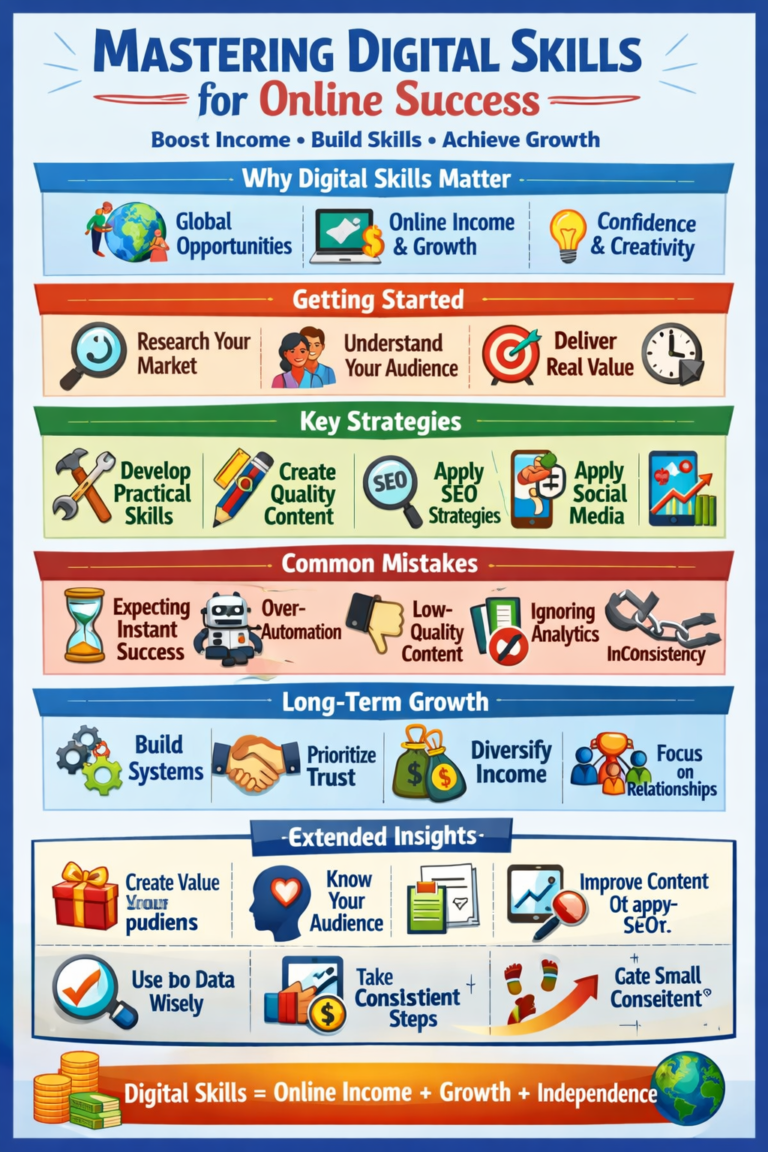
Digital Opportunities: How to Build Skills for the Modern Online Economy
Digital opportunities are changing how people learn, communicate, solve problems, and participate in the modern economy. From online education and remote collaboration to digital marketing and website development, technology provides new ways to apply knowledge and develop useful skills.
However, having access to the internet does not automatically create an opportunity. People still need relevant skills, reliable information, practical experience, and a clear understanding of the problems they want to solve.
This guide explains what digital opportunities are, where they can be found, how digital skills can help you participate, and how to evaluate opportunities before investing your time or money.
The goal is to help readers make informed decisions rather than assume that every online opportunity will lead to employment, business growth, or income.
What Are Digital Opportunities?
Digital opportunities are ways to learn, work, communicate, create, or solve problems using digital technology.
They can involve using computers, mobile devices, software, websites, online platforms, and internet-based services to complete tasks that would otherwise be difficult, expensive, or less convenient.
For example, a student can use an online learning platform to study a new subject. A small business owner can use digital tools to organize customer enquiries. A designer can create digital illustrations for a portfolio, while a developer can build a website that solves a specific problem.
These examples demonstrate an important point: a digital opportunity is not necessarily a way to make money. It can also be a way to gain knowledge, improve productivity, communicate more effectively, or develop professional experience.
The value of an opportunity depends on the problem it addresses and the benefit it provides to the people using it.
Why Digital Opportunities Matter
Digital technology has changed how many organizations share information, serve customers, and coordinate work. It has also made educational resources and creative tools available to people who may not have easy access to traditional alternatives.
Understanding these changes can help individuals prepare for new responsibilities and make better use of available resources.
1. Access to Learning Resources
People can study subjects such as programming, writing, graphic design, digital marketing, data analysis, and business management through online courses, documentation, tutorials, and educational communities.
Access alone does not guarantee learning. Progress usually requires regular practice, feedback, and the ability to apply information to real tasks.
For example, someone learning web development can study HTML and CSS, then build a simple personal webpage to demonstrate what they understand.
2. New Ways to Apply Professional Skills
Digital tools allow people to perform many tasks remotely or collaborate with others in different locations.
Depending on the role and employer, these tasks may include writing, research, design, customer support, software development, data management, and digital communication.
Remote work is not available for every occupation, and opportunities vary by location, experience, qualifications, and employer requirements. Nevertheless, understanding digital tools can be useful in many professional environments.
3. Improved Business Operations
Small businesses can use digital technology to organize their activities and communicate with customers.
Examples include using spreadsheets to track expenses, creating a website to explain services, maintaining an online catalogue, and using customer relationship management software to organize enquiries.
The purpose of these tools is not simply to appear modern. They should help the business complete tasks more accurately, serve customers more effectively, or understand its operations.
4. Creative and Educational Projects
Digital tools can support activities such as video editing, illustration, photography, writing, animation, and educational content creation.
A learner might create an illustrated explanation of a science topic, while a local business could develop a short video demonstrating how one of its products works.
These projects can help people practise technical skills, communicate ideas, and create examples of their work.
Seven Areas Where Digital Opportunities Can Be Found
Digital opportunities exist across different fields. The best starting point depends on a person’s interests, available resources, current abilities, and goals.
1. Digital Education
Online education allows learners to study subjects and practise skills at their own pace.
Useful activities include:
- Studying a course related to a chosen skill.
- Reading official software documentation.
- Completing practical exercises.
- Participating in appropriate learning communities.
- Building a small project to demonstrate understanding.
Practical example: A beginner studying spreadsheets could create a simple monthly expense tracker. The project provides an opportunity to practise formulas, formatting, sorting, and basic data organization.
Before choosing a course, review its syllabus, learning requirements, cost, and available practice exercises. A certificate may be useful in some situations, but practical ability and the requirements of the intended role also matter.
2. Website and Software Development
Websites and software help individuals and organizations provide information, manage processes, and deliver services.
Relevant skills may include HTML, CSS, JavaScript, programming logic, database fundamentals, accessibility, testing, and security awareness.
Practical example: A learner could build a basic website for a fictional community library. The website might display opening hours, available services, contact information, and a list of recommended books.
This project can demonstrate an understanding of page structure, navigation, responsive design, and information organization.
Beginners should start with projects that match their current ability instead of attempting to build a complicated application immediately.
3. Digital Marketing
Digital marketing involves communicating with an audience through digital channels. Depending on the business, it can include search engine optimization, email communication, social media content, website analysis, and online advertising.
Useful skills include understanding an audience, writing clear messages, researching search terms, interpreting basic performance data, and measuring whether a campaign achieves its purpose.
Practical example: A small bakery wants to make its opening hours and product information easier to find online. A beginner could help organize the website’s information, prepare accurate product descriptions, and create a simple content calendar.
The result should be evaluated using relevant measures, such as whether customers can find the information they need or whether enquiries become easier to manage.
Digital marketing does not guarantee sales. Results depend on factors such as customer demand, competition, pricing, product quality, and execution.
4. Content Creation and Digital Design
Content creation involves developing useful or entertaining material for an intended audience. Digital design focuses on communicating information through visual elements and layouts.
Examples include educational articles, illustrations, presentations, diagrams, product photographs, and short instructional videos.
Useful skills include research, writing, visual communication, editing, and understanding copyright.
Practical example: A learner interested in design could create a set of three educational posters explaining how to protect personal information online.
The project would provide an opportunity to practise layout, typography, visual hierarchy, and clear communication.
Creators should use material they have permission to use and should avoid presenting another person’s work as their own.
5. Data Analysis and Spreadsheet Skills
Organizations use data to understand activity, identify patterns, and support decisions.
Beginners can start by learning spreadsheet formulas, sorting, filtering, charts, data cleaning, and basic statistical concepts.
Practical example: A learner could create a spreadsheet containing fictional monthly sales for a small shop. They could calculate totals, compare product categories, and create a chart showing changes over time.
This exercise demonstrates how raw information can be organized into something easier to understand.
When working with real information, protect personal and confidential data. Use fictional or properly authorized data for learning projects.
6. Artificial Intelligence and Productivity Tools
Artificial intelligence tools can assist with activities such as brainstorming, summarizing information, explaining unfamiliar concepts, drafting text, and generating ideas for software projects.
However, AI-generated output can contain mistakes, incomplete explanations, or unsupported claims.
A responsible user should verify important information, protect private data, respect copyright, and follow the rules of the school, workplace, or platform involved.
Practical example: Someone learning digital marketing could ask an AI assistant to suggest several content ideas for a fictional business. They could then evaluate those ideas against the business’s audience, available resources, and actual needs.
The learning value comes from reviewing and improving the suggestions, not simply accepting the generated response.
AI tools should support human judgment rather than replace the need to understand the task.
7. Online Business and Digital Services
Digital tools can help businesses explain their services, manage orders, communicate with customers, and organize records.
Some people also develop skills that may be relevant to services such as writing, web design, editing, illustration, or website maintenance.
However, developing a skill does not guarantee that customers will pay for it. Demand, experience, reliability, competition, communication, and the quality of the work all influence whether a service is useful to potential customers.
Practical example: Someone learning website design could create a sample website for a fictional restaurant. The project could include a menu, opening hours, contact information, and a mobile-friendly layout.
The sample would allow the learner to practise and demonstrate the skill before deciding whether to pursue further projects.
How to Choose the Right Digital Opportunity
Not every opportunity is suitable for every person. A practical choice should fit your goals, resources, interests, and current level of experience.
Use the following questions to compare options.
Step 1: Identify Your Goal
Decide what you want to achieve.
Your goal might be to improve your schoolwork, learn a professional skill, solve a problem, build a portfolio, support a business, or explore a possible career.
A clear goal makes it easier to choose useful activities and measure progress.
Step 2: Assess Your Current Skills
Write down what you already know and what you need to learn.
For example, someone interested in website development might already understand basic computer use but need to learn HTML, CSS, and JavaScript.
This assessment helps turn a broad ambition into a manageable learning plan.
Step 3: Consider Your Available Resources
Think about the resources you can realistically use.
These might include:
- A computer or suitable mobile device.
- Reliable internet access.
- Time for study and practice.
- Free learning materials.
- Required software.
- Money for optional courses or equipment.
You do not need to purchase an expensive course or tool before you understand the basics. Start with suitable resources you can access and expand your toolkit when there is a clear reason to do so.
Step 4: Look for a Real Problem to Solve
A useful project addresses a specific need.
Instead of setting a vague goal such as learning everything about digital marketing, choose a manageable task. You might learn to write clearer website descriptions, organize a content calendar, or interpret basic website statistics.
A defined problem makes it easier to choose the right skill and assess the result.
Step 5: Compare the Benefits, Costs, and Risks
Before committing to an opportunity, consider what it requires and what it realistically offers.
Ask:
- What skills or qualifications are required?
- How much time will it take?
- Are there fees or recurring costs?
- Can I verify the organization or service?
- What evidence supports the claims being made?
- What could I lose if the opportunity does not work out?
- Are there privacy, security, or legal concerns?
Be cautious about offers that promise guaranteed earnings, demand urgent payment, hide important conditions, or ask for sensitive information without a clear and legitimate reason.
A genuine opportunity should be evaluated on its actual terms, not only on persuasive advertising.
A Practical Example: Turning a Skill into a Useful Project
Consider a learner who wants to understand how digital skills can solve everyday problems.
Rather than immediately looking for a way to earn money, the learner decides to practise spreadsheet skills.
First, they learn basic formulas and formatting. Next, they create a fictional expense tracker with categories such as transport, learning materials, food, and savings.
They then add formulas to calculate totals and use a chart to make the information easier to understand.
Finally, they test the spreadsheet with different sample figures and write a short explanation of how it works.
This small project creates several learning outcomes:
- Practical experience with spreadsheet formulas.
- An understanding of how information can be organized.
- Experience checking calculations.
- A project that can be demonstrated to others.
- A clearer idea of which skills to learn next.
The project does not automatically create employment or income. Its immediate value is that the learner has practised a useful skill and produced evidence of what they can do.
The same approach can be applied to writing, design, programming, research, and other digital fields.
A Four-Week Plan for Exploring Digital Opportunities
A short plan can help you move from general interest to practical experience.
Week 1: Explore and Choose
Choose one area that interests you, such as spreadsheets, web development, writing, design, or digital marketing.
Research what beginners need to know. Compare a few suitable learning resources and choose one manageable skill to practise.
Goal: Identify one skill, one learning resource, and one small project.
Week 2: Learn the Fundamentals
Study the basics and practise through short exercises.
Keep notes about what you understand, what you find difficult, and which questions need further investigation.
Goal: Complete several exercises and explain the main concepts in your own words.
Week 3: Build a Small Project
Apply what you have learned to a realistic but manageable task.
For example, write a sample article, create a spreadsheet, design a poster, or build a simple webpage.
Check your work for errors and make improvements based on what you have learned.
Goal: Produce one completed project that demonstrates your current skills.
Week 4: Review and Improve
Evaluate the project and identify what you would improve.
Ask someone you trust for constructive feedback where appropriate. Compare your work against the project’s original goal and note which skills you should practise next.
Goal: Document what you learned and create a realistic next-step plan.
By the end of the four weeks, you may have a stronger foundation and a practical example of your work. Your progress will depend on your starting point, available time, and the complexity of the skill.
Common Mistakes When Exploring Digital Opportunities
Expecting Immediate Results
Learning a useful skill takes time. A short course or a few practice sessions may introduce a subject, but developing reliable ability usually requires continued effort.
Focus first on understanding the skill and applying it to practical tasks.
Following Every New Trend
New tools and platforms appear regularly. Trying to learn everything at once can make it difficult to develop competence in any one area.
Choose a skill based on your goal and the problems you want to solve. Explore other tools when they offer a clear benefit.
Confusing Popularity with Value
A widely discussed platform or business idea may not suit your circumstances.
Evaluate whether it solves a real problem, whether you can learn the required skills, and whether the costs and risks are reasonable.
Paying Before Checking the Details
Some courses and services provide useful instruction, while others may offer little value for their price.
Review the curriculum, terms, refund conditions, independent information, and the provider’s identity before paying. Do not assume that an expensive course guarantees a better outcome.
Ignoring Practice
Watching tutorials can help you understand concepts, but practice helps you discover what you can actually do.
Whenever possible, turn what you learn into a small project and review the result.
Accepting AI Output Without Verification
AI tools can produce convincing but inaccurate information. Verify important claims using reliable sources and test technical instructions before relying on them.
Avoid sharing passwords, private documents, financial information, or other sensitive data with tools unless you understand the service’s data practices and have permission to share the information.
How to Measure Your Progress
You do not need to measure progress only through money, followers, or certificates.
For a beginner, more useful indicators may include:
- Completing a project without following every instruction.
- Explaining a concept clearly.
- Finding and correcting mistakes.
- Applying a skill to a new problem.
- Improving work after receiving feedback.
- Building a small portfolio of original projects.
- Identifying the next skill to develop.
If your goal involves a business or professional role, additional measures may become relevant. These could include customer satisfaction, completed tasks, response times, project quality, or other results connected to the work.
Choose measures that match your goal rather than assuming that one measure is suitable for every situation.
Frequently Asked Questions
What are digital opportunities?
Digital opportunities are ways to learn, communicate, work, create, or solve problems using digital technology. Examples include online education, website development, digital marketing, data analysis, and digital design.
Do digital opportunities always generate income?
No. Some opportunities support learning, productivity, education, or personal projects rather than income. Paid work and business opportunities depend on factors such as skill, demand, qualifications, competition, and the terms of the opportunity.
Which digital skill should a beginner learn first?
Start with a skill connected to a clear goal. Digital literacy, online research, communication, spreadsheets, writing, and basic web development can all be useful starting points. The best option depends on your interests and intended use.
Can I learn digital skills without paying for a course?
Yes. Free tutorials, official documentation, educational resources, and practice projects can help you learn many skills. Paid courses may offer structure or feedback, but compare their costs and benefits before making a decision.
How can I tell whether an online opportunity is legitimate?
Research the organization or individual, read the terms carefully, verify claims independently, and understand all costs before committing. Be cautious of guaranteed-income promises, pressure to pay quickly, requests for unnecessary sensitive information, and unclear business arrangements.
How does artificial intelligence help people explore digital opportunities?
AI tools can help with brainstorming, explanations, drafting, and practice exercises. Their output still needs human review and verification. AI is most useful when it helps someone understand a task or improve their work rather than simply producing unexamined results.
Final Thoughts
Digital opportunities can help people develop skills, learn new subjects, improve everyday processes, and explore different ways to work and create.
The most useful starting point is not necessarily the newest platform or the most popular online trend. It is a clear goal, a relevant skill, and a practical problem you can work on.
Choose one area, learn the fundamentals, build a small project, and evaluate what you have achieved. Review your results honestly and use what you learn to decide your next step.
Digital technology provides tools and possibilities, but meaningful progress comes from using those tools thoughtfully, practising consistently, and making informed decisions.