Digital Skills: A Practical Guide to Learning, Using, and Developing Online Skills
Digital skills have become an important part of modern education, employment, business, and communication. People use technology every day to communicate with colleagues, create documents, analyze information, manage businesses, learn new subjects, and connect with customers.
Learning digital skills does not necessarily mean becoming a software developer. Digital literacy includes a wide range of abilities, from using productivity applications and creating content to understanding search engines, managing social media, analyzing data, and building websites.
For students, employees, freelancers, entrepreneurs, and career changers, developing practical digital skills can make it easier to participate in an increasingly technology-driven economy.
This guide explains what digital skills are, why they matter, which skills beginners can learn, and how to develop them through practical experience.
What Are Digital Skills?
Digital skills are the abilities needed to use digital devices, software, online platforms, and internet-based services effectively.
They range from basic computer knowledge to advanced technical abilities.
For example, a beginner may need to know how to:
- Create and organize digital documents
- Use email and online communication tools
- Search for reliable information online
- Protect personal accounts with strong security practices
- Use spreadsheets to organize information
- Create presentations
- Manage files and folders
- Participate in online meetings
More advanced digital skills include:
- Web development
- Graphic design
- Search engine optimization
- Data analysis
- Digital marketing
- Video production
- Cloud computing
- Software development
- User interface design
- Artificial intelligence applications
The right skills depend on a person’s goals, interests, education, and career path.
Why Digital Skills Matter
Technology has changed how organizations operate and how people communicate and work. Many businesses now depend on websites, cloud applications, digital communication, online payments, analytics, and social media.
As a result, digital knowledge can be useful in almost every industry.
A person working in education may use online learning platforms and presentation software. Someone working in marketing may use analytics and social media tools. A business owner may need a website, online payment system, customer database, or email marketing platform.
Digital skills therefore have value beyond technology companies.
1. They Improve Workplace Productivity
Knowing how to use common digital tools can make everyday tasks more organized.
For example, spreadsheets can be used to track expenses, documents can be shared with colleagues, and project-management applications can help teams monitor deadlines.
Learning these tools can reduce unnecessary manual work and improve collaboration.
2. They Support Career Development
Employers frequently use digital systems for communication, recruitment, project management, customer service, and record keeping.
Developing relevant skills can help a person qualify for opportunities that require specific technical or digital knowledge.
However, digital skills should be viewed as one part of professional development. Communication, reliability, critical thinking, and teamwork remain important as well.
3. They Make Online Learning Easier
The internet provides access to courses, tutorials, documentation, lectures, communities, and other educational resources.
Someone interested in web development, for example, can study HTML, CSS, JavaScript, and other technologies through structured learning materials and then reinforce that knowledge by building projects.
Different Categories of Digital Skills
Digital skills can be divided into several broad categories.
Basic Digital Literacy
Basic digital literacy is the foundation for using technology confidently.
It includes:
- Operating a computer or smartphone
- Managing files
- Using web browsers
- Sending and receiving email
- Using search engines
- Installing and updating software
- Understanding basic online safety
These skills are useful regardless of career choice.
Communication and Collaboration
Many organizations rely on digital communication.
Useful skills include using:
- Video conferencing applications
- Team messaging platforms
- Shared documents
- Online calendars
- Project-management systems
Effective digital communication also involves writing clearly, responding appropriately, and understanding professional communication etiquette.
Content Creation
Content creation involves producing useful material for a particular audience.
Examples include:
- Articles
- Presentations
- Images
- Videos
- Podcasts
- Infographics
- Educational materials
Successful content is not simply about publishing frequently. It should have a clear purpose and provide information that the intended audience can understand and use.
Digital Marketing
Digital marketing involves promoting products, services, organizations, or ideas through online channels.
Common areas include:
- Search engine optimization
- Social media marketing
- Email marketing
- Content marketing
- Online advertising
- Analytics
A beginner should learn the principles behind these areas rather than depending entirely on automated tools.
Data and Spreadsheet Skills
Data skills are useful in business, education, finance, administration, research, and many other fields.
Beginners can start with spreadsheet software and learn how to:
- Enter and organize information
- Sort and filter data
- Use formulas
- Create charts
- Identify patterns
- Prepare simple reports
More advanced learners can progress to databases, SQL, programming, and data visualization.
Web Development
Web development is another important digital skill.
A beginner can start with:
- HTML for page structure
- CSS for presentation and layout
- JavaScript for interactive behavior
After learning these fundamentals, learners can explore frameworks and libraries such as React or other technologies based on their goals.
The best way to learn web development is to build small projects rather than only watching tutorials.
How to Start Learning Digital Skills
Learning too many technologies at the same time can make the process unnecessarily difficult.
A better approach is to choose one area and build a foundation before moving to another.
Step 1: Define Your Goal
Start by asking what you want to accomplish.
For example:
- Improve your current job skills
- Prepare for a new career
- Build websites
- Create digital content
- Understand online marketing
- Analyze business data
- Start freelancing
- Develop a personal project
A clear goal helps determine which skills are worth learning first.
Step 2: Choose One Core Skill
Instead of attempting to learn everything, select one skill that matches your goal.
For example, someone interested in websites could begin with HTML and CSS.
Someone interested in marketing could begin with content writing, audience research, and basic SEO.
Someone interested in business administration could begin with spreadsheets and data organization.
Step 3: Use Reliable Learning Resources
There are many educational resources available online.
Look for materials that explain concepts clearly and include exercises or practical projects.
Learning resources can include:
- Official documentation
- Online courses
- Educational videos
- Books
- Practice platforms
- Community discussions
- Structured tutorials
Free resources can be useful, but learners should evaluate the quality and accuracy of information before relying on it.
Step 4: Practice Through Projects
Practice is one of the most important parts of learning a digital skill.
Instead of repeatedly watching tutorials, create something.
For example:
Web development: Build a personal portfolio website.
Graphic design: Create a small collection of sample designs.
Data analysis: Organize a sample dataset and produce charts.
Content creation: Write a series of useful educational articles.
Digital marketing: Create a simple content plan for an imaginary business.
Projects help reveal gaps in knowledge and provide evidence of practical ability.
Step 5: Review and Improve Your Work
Learning should include regular review.
After completing a project, ask:
- What worked well?
- What was difficult?
- What could be improved?
- Did I achieve the original goal?
- What should I learn next?
This process turns individual projects into continuous learning.
Digital Skills That Beginners Can Consider
There is no single list of skills that everyone should learn. The best choice depends on personal goals.
However, beginners may consider:
Communication
Clear written and verbal communication is useful in almost every profession.
Microsoft Office or Similar Productivity Tools
Word processors, spreadsheets, and presentation applications are widely used in workplaces.
Graphic Design
Basic design knowledge can help people create presentations, social media graphics, documents, and other visual materials.
SEO
Search engine optimization teaches how websites can be structured and improved so that search engines can better understand their content.
Web Development
Web development can lead to projects involving websites, web applications, and online services.
Data Analysis
Data analysis involves collecting, organizing, interpreting, and presenting information to support decisions.
Cybersecurity Awareness
Everyone who uses the internet should understand basic security principles such as strong passwords, software updates, privacy settings, and recognizing suspicious messages.
Artificial Intelligence Literacy
AI tools are increasingly being incorporated into education and professional workflows. Understanding their capabilities and limitations is becoming another useful digital skill.
Using Artificial Intelligence Responsibly
Artificial intelligence can support many digital tasks, including brainstorming, summarizing information, generating ideas, writing code, and organizing workflows.
However, AI-generated information should not automatically be treated as accurate.
Users should:
- Verify important information
- Review generated text carefully
- Protect private information
- Check facts using reliable sources
- Add their own expertise and judgment
- Follow the rules of the platform or organization they are working with
AI can make certain tasks faster, but understanding the underlying subject remains important.
Building a Digital Portfolio
A portfolio can demonstrate practical skills more effectively than simply listing technologies on a résumé.
A beginner can create a portfolio containing a few carefully completed projects.
For example, a digital marketing portfolio might include:
- A sample content strategy
- An SEO research exercise
- A social media content calendar
- A sample campaign analysis
A web developer might include:
- A responsive website
- A small web application
- A dashboard
- A personal portfolio website
The purpose is to demonstrate what you can actually do.
Digital Skills and Freelancing
Freelancing is one possible application of digital skills. Professionals may provide services such as writing, design, programming, data analysis, video editing, or marketing.
However, learning a skill does not guarantee immediate freelance income.
A sustainable freelance career usually requires several abilities beyond technical knowledge, including:
- Communication
- Project planning
- Time management
- Understanding client requirements
- Meeting deadlines
- Creating clear proposals
- Handling feedback professionally
Beginners should focus first on developing useful skills and producing quality work.
Common Mistakes When Learning Digital Skills
Trying to Learn Everything
Technology contains thousands of tools and platforms. Attempting to master many of them simultaneously can create confusion.
Choose a focused learning path.
Depending Entirely on Tutorials
Watching tutorials can introduce concepts, but passive learning is not enough.
Apply new knowledge through practical exercises.
Chasing Every New Trend
Technology changes quickly. Not every new tool deserves your attention.
Focus on fundamental concepts that remain useful even when specific tools change.
Ignoring Security
Digital skills should include responsible technology use.
Protect accounts, use appropriate privacy settings, keep software updated, and be cautious with unexpected links and downloads.
Expecting Immediate Results
Learning takes time. Progress may be slow at first, particularly when dealing with unfamiliar concepts.
Consistent practice is more useful than expecting overnight results.
How to Continue Developing Your Skills
Digital learning does not have a fixed endpoint.
Once you understand one skill, you can gradually build related abilities.
For example:
Web development → JavaScript → React → APIs → databases → full-stack development
Or:
Content writing → SEO → analytics → content strategy → digital marketing
This approach creates a logical progression rather than forcing you to learn unrelated technologies.
Frequently Asked Questions
What are digital skills?
Digital skills are abilities that allow people to use digital devices, software, online services, and technology effectively.
Which digital skill should a beginner learn first?
There is no universal answer. Start with a skill that directly supports your career, education, business, or personal goal.
Can digital skills be learned for free?
Yes. Many free tutorials, documentation, educational videos, and practice resources are available online. The important thing is to choose reliable learning materials and practice consistently.
How long does it take to learn a digital skill?
The timeframe depends on the complexity of the skill, previous experience, available study time, and the level of competence you want to reach.
Is artificial intelligence replacing digital skills?
AI is changing how many tasks are performed, but people still need knowledge to evaluate results, make decisions, communicate, solve problems, and use technology responsibly.
Final Thoughts
Digital skills are no longer limited to people working in the technology industry. They are increasingly useful in education, business, administration, marketing, creative work, finance, healthcare, and many other fields.
The most effective way to develop these skills is to start with a clear goal, select an appropriate learning path, practice regularly, and build projects that demonstrate what you have learned.
Rather than trying to master every new technology, focus on developing a strong foundation and gradually expanding your knowledge.
Technology will continue to change, but the ability to learn, evaluate information, solve problems, communicate clearly, and use digital tools responsibly will remain valuable.
Start with one skill, practice it consistently, learn from your mistakes, and build from there.
This section provides an overview of the blog, showcasing a variety of articles, insights, and resources to inform and inspire readers.
-
AI Side Hustles: Practical Ways to Use Artificial Intelligence to Build Skills and Services
Artificial intelligence is changing how people learn, create, communicate, and complete everyday business tasks. Tools…
-
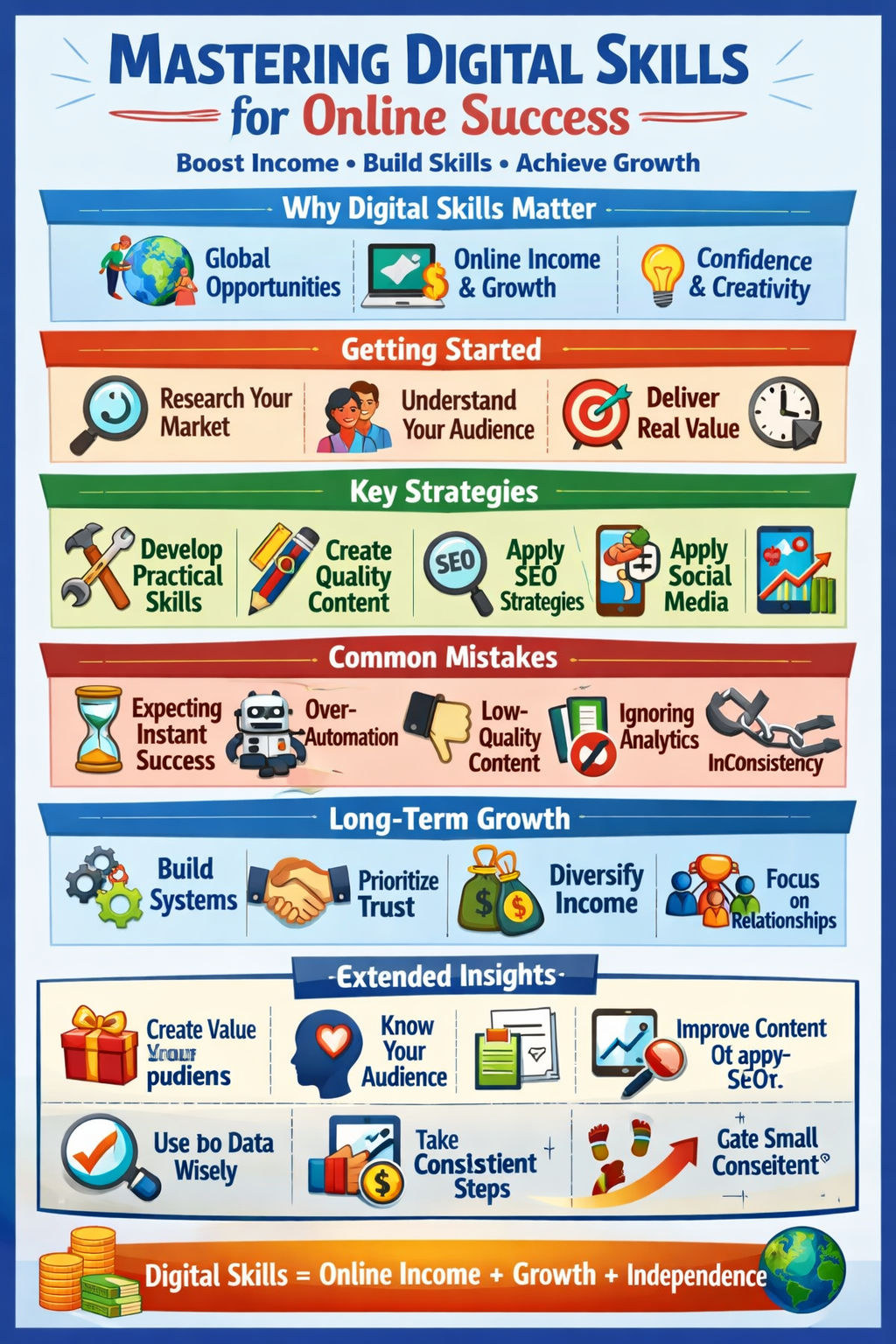
Digital Skills: A Practical Guide to Learning, Using, and Developing Online Skills
Digital skills have become an important part of modern education, employment, business, and communication. People…
-

Digital Opportunities: How to Build Skills for the Modern Online Economy
The internet has changed the way people learn, communicate, work, and build businesses. Today, students,…